Clean Post Content for Divi 5 (Plugin WordPress)
Client:
Personal Project
Role:
Designer and Developer
TImeline:
1 month
Clean Post Content
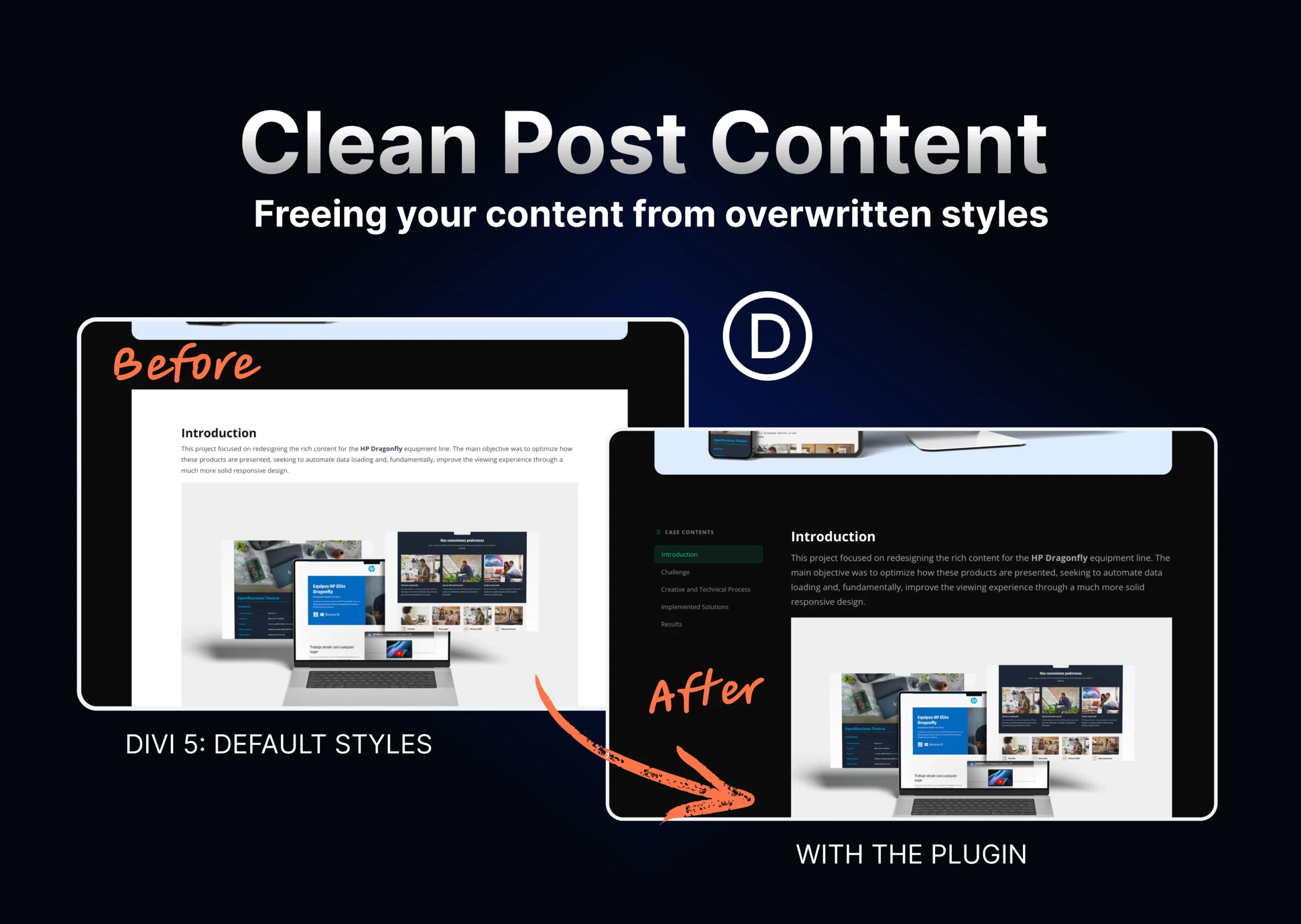
A WordPress plugin that eliminates the forced styles from Divi 5's Post Content module, returning full design control to the user directly from the Divi Builder.
Project type: WordPress Plugin / Developer Tool
Role: Designer and Developer — concept, architecture, development, and implementation
Stack: PHP, WordPress Plugin API, CSS, JavaScript
Status: Active in production at danielweb.net
Context & Role
Moving from Divi 4 to Divi 5 was straightforward at first. The interface was familiar, and I could build pages quickly. But over time I started noticing gaps — premium plugins I had been using regularly with Divi 4 were only partially compatible with the new version, or had stopped working altogether.
Each missing feature meant finding a new solution. One of those searches turned into this project.
My role was end-to-end: I identified the problem from my own experience as a user, investigated its technical root causes, defined the solution architecture, and developed the plugin from start to finish.
The Problem
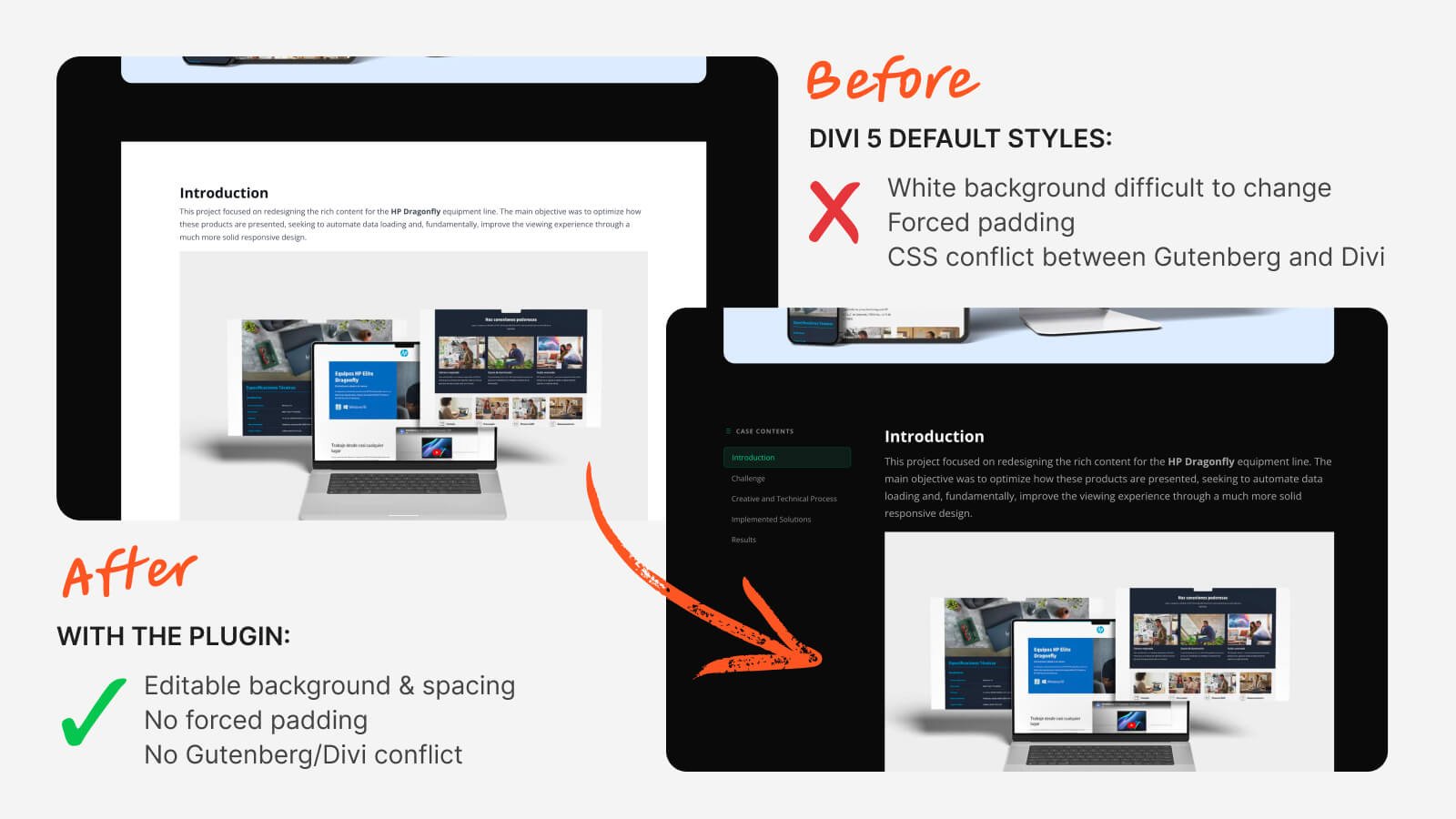
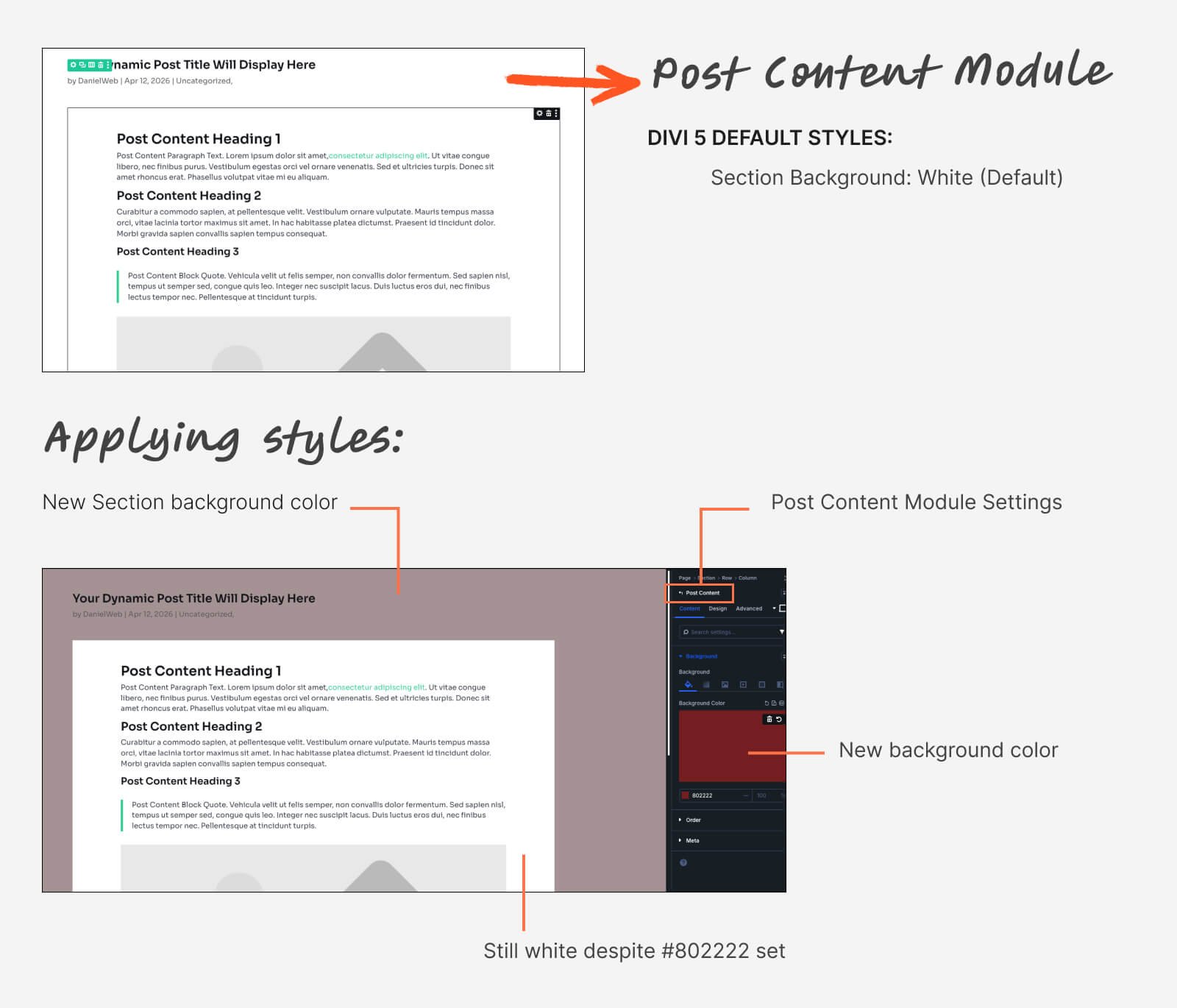
I was building danielweb.net with a dark design — dark backgrounds, light typography, no unnecessary decorative elements. When I created the global Single Post template in Divi's Theme Builder, I ran into a problem I couldn't solve from the panel: the Post Content module was automatically generating a white-background box with fixed margins that ignored every style I configured in the Builder.
I tried changing the background color, the padding, the margins — all through Divi's native options. Nothing worked. The white box kept appearing on top of my dark design, breaking the visual consistency of the site.
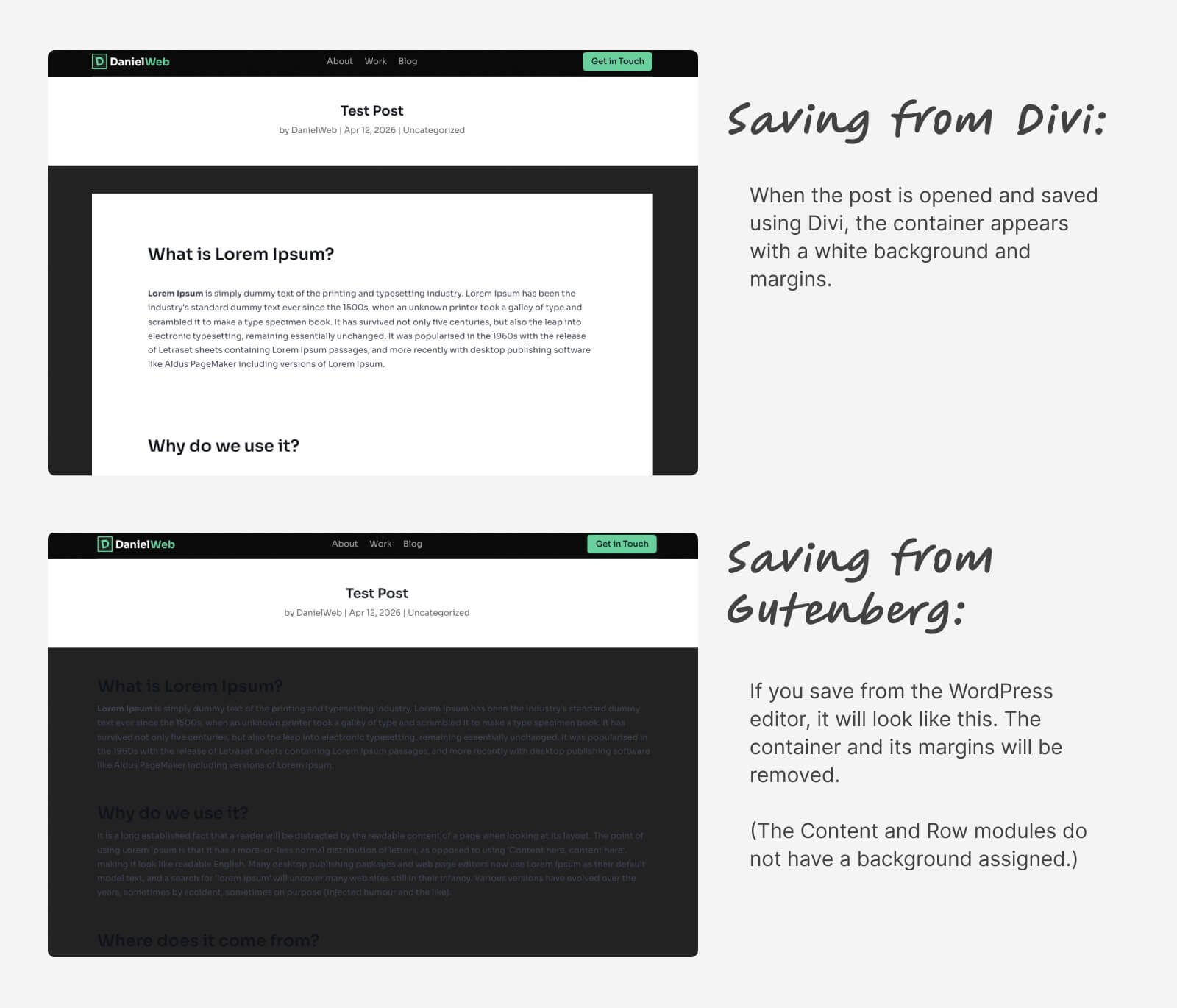
The temporary fix was applying highly specific CSS to override Divi's styles. But that created a second problem: saving a post from the Gutenberg editor produced a different result than saving it from the Divi Builder. Each time I switched editors, the styles shifted. It was an unstable loop with no clean resolution.
I searched forums and official documentation without finding anything concrete. When I consulted AI tools, the answer was consistent: this was a known Divi 5 bug that other users had been reporting, with no official fix available. With no external solution in sight, I decided to build my own.
Process
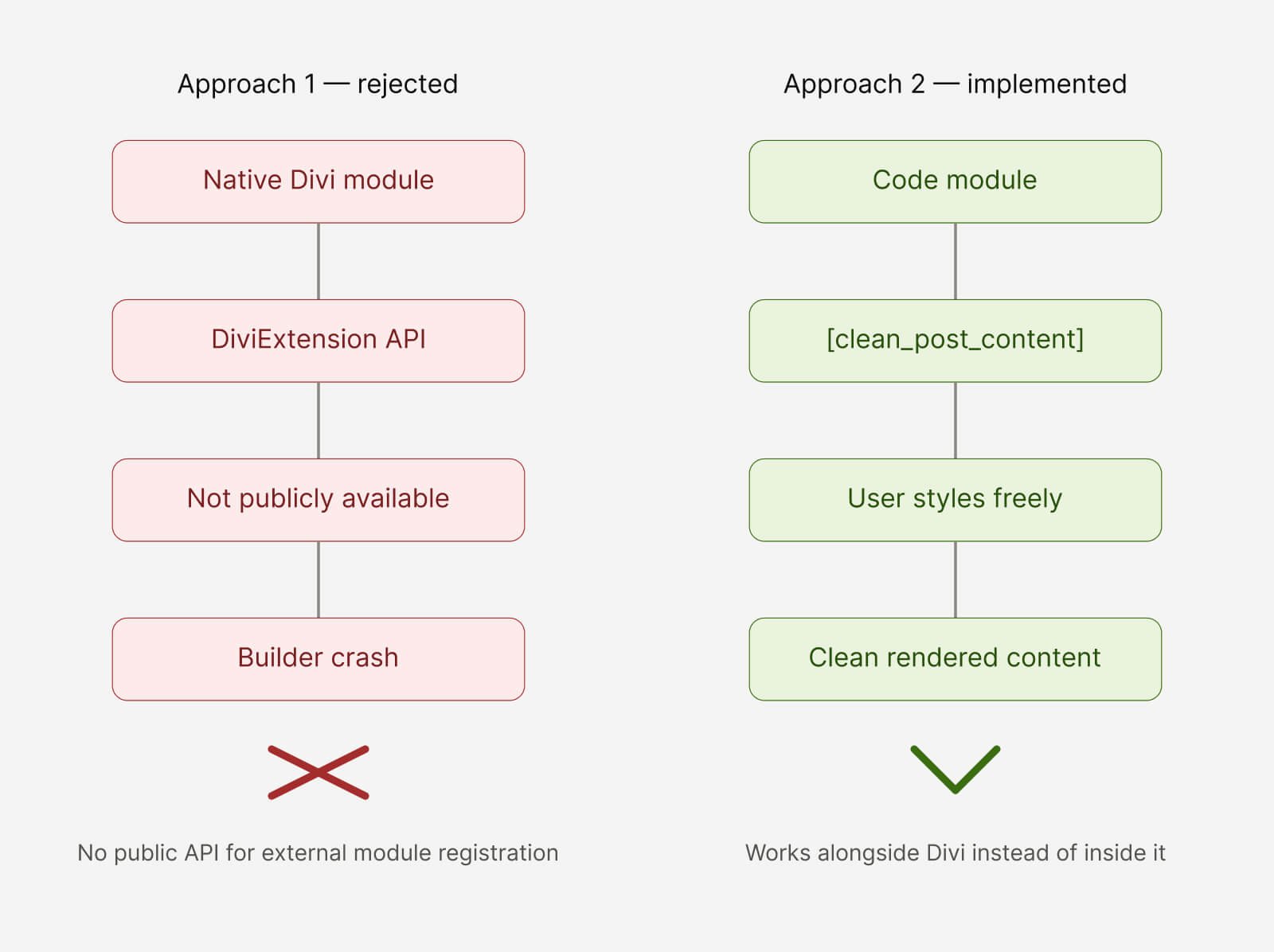
The first approach was the most ambitious: build a native Divi 5 module that would fully replace the original Post Content module, with design options integrated directly into the Builder panel. This would have given the most seamless experience for the end user.
The problem was that Divi 5 had rewritten its module architecture in React and doesn't expose a stable public API for external developers to register new modules. Attempts to use DiviExtension and ET_Builder_Module triggered critical errors that crashed the Builder entirely. Each attempt required diagnosis, adjustment, and a new test cycle — an iterative process that confirmed this path wasn't viable without access to Elegant Themes' internal API.
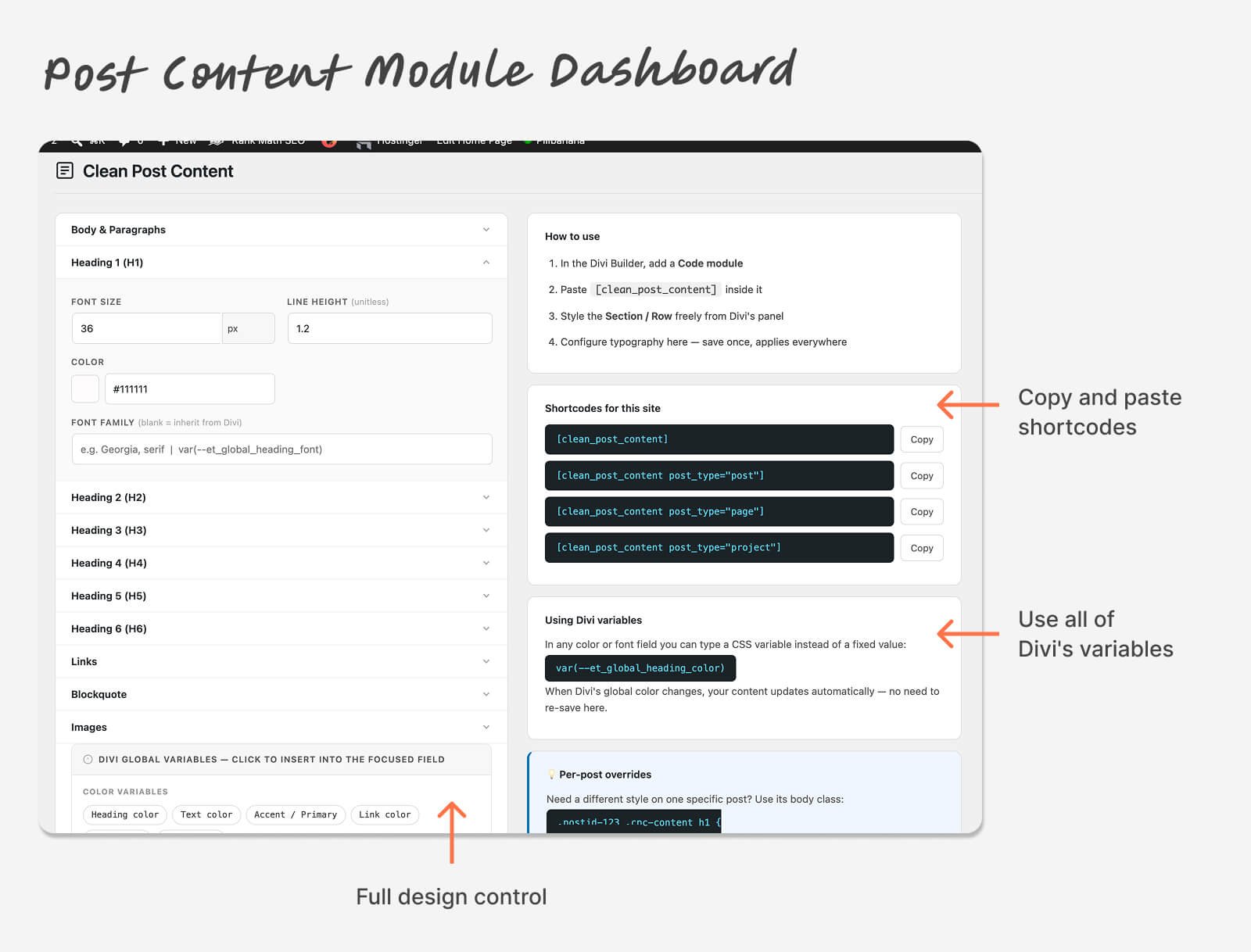
The pivot was to a shortcode architecture. Instead of competing with Divi's module system, the plugin works alongside it: a (clean_post_content) shortcode is placed inside a Divi Code module, and from that module the user has full design control through the Builder's native panel — background, padding, margins, animations, borders. Content typography is configured from a dedicated settings panel inside WordPress admin.
During development, another constraint emerged: Divi 5 no longer stores its global colors and fonts in wp_options as Divi 4 did. They live inside its internal React system, inaccessible from PHP. The solution was a CSS variable system — users can type "var(--et_global_heading_color)" in any color field in the plugin, and when Divi updates that global color, the content updates automatically without touching the plugin settings.
Solution
Clean Post Content for Divi 5 solves the problem in three layers:
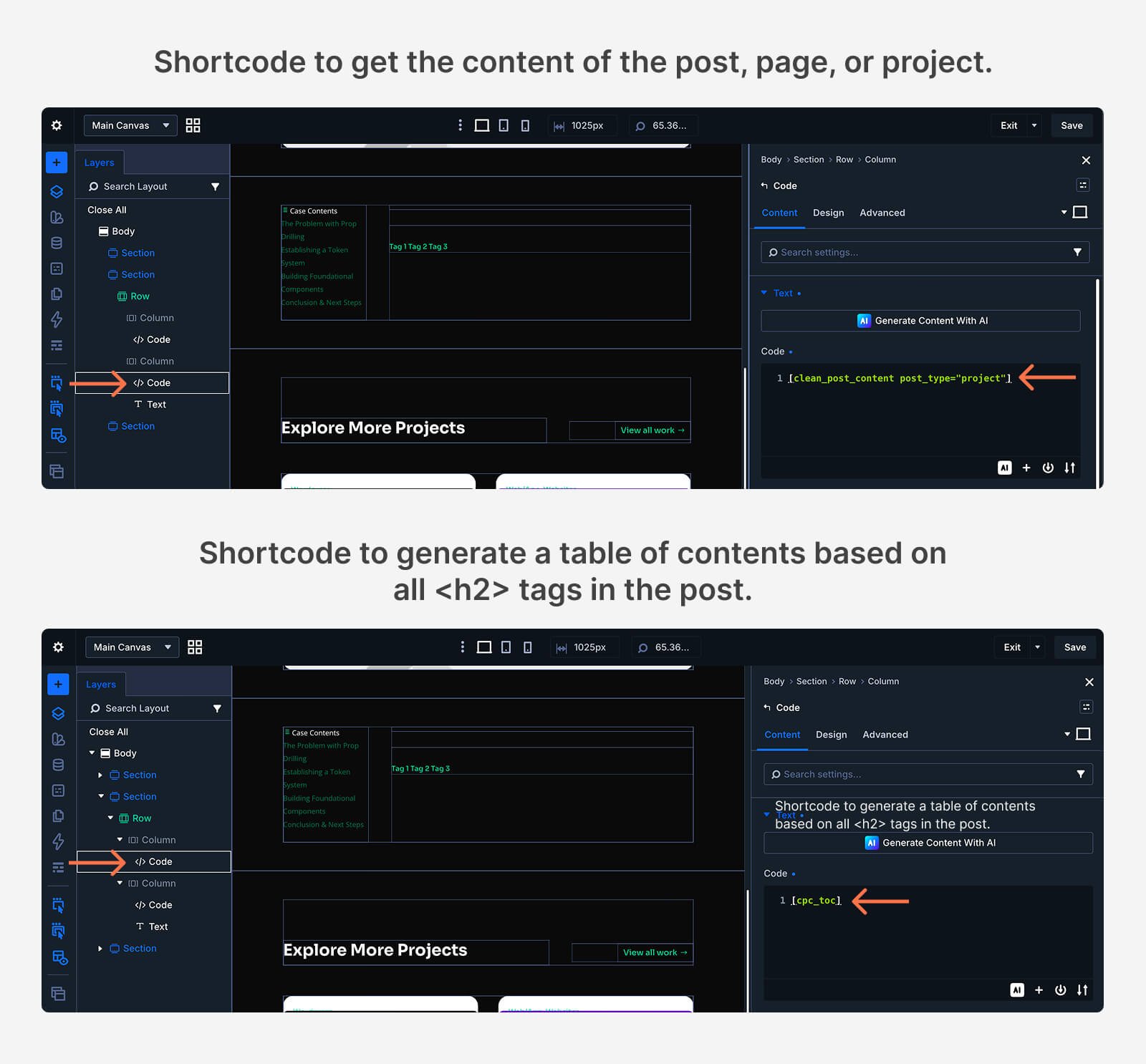
(clean_post_content) shortcode — renders the current post's content without Divi's or Gutenberg's forced wrappers and styles. Placed inside a Builder Code module, which the user can style freely from Divi's native panel like any other module.
Typography settings panel — a configuration page at WordPress Admin → Tools → Clean Post Content with visual controls for body text, H1 through H6, links, blockquotes, and images. Every field accepts standard CSS values (px, em, rem, %, vw) or Divi CSS variables. Settings are saved once and applied to every post using the shortcode.
(cpc_toc) shortcode — automatically generates a navigable table of contents from the article's H2 headings, with scroll spy that updates the active item as the reader moves through sections. Designed for case studies and long-form content templates.
The plugin also includes a CSS fixer that runs globally on the frontend, neutralizing the problematic styles from Divi's original Post Content module in case it's used in parallel.
Results
The most direct result is the elimination of the original problem: danielweb.net has a consistent dark design across all posts, with no patch CSS and no visual difference between Gutenberg and the Divi Builder.
The workflow impact is concrete. Before this plugin, every new WordPress installation with Divi required identifying the same problem, writing highly specific CSS overrides, and debugging the conflict between editors. Now the plugin installs once and that problem simply doesn't exist on any installation running it.
The typography panel consolidates a decision that was previously scattered — part in Divi's customizer, part in custom CSS, part in individual Text modules. One configuration, applied consistently across the entire site.
Real Learning
The most important lesson from this project wasn't technical — it was about researching before building. Divi 5's internal architecture isn't documented for external developers. What looked like a straightforward task — registering a new module — turned out to be impossible because of how Elegant Themes closed their API when migrating to React. Discovering that cost several failed attempts and real development time.
The second lesson was about the value of the pivot. Letting go of the original approach — the native module — and redesigning the solution as a shortcode wasn't a technical defeat. It was the correct architectural decision. The result is more stable and maintainable than a native module would have been, one that would have depended on undocumented internal APIs and could break with every Divi update.
Finally, this project confirmed something about the process of building tools: the best starting point for a plugin is a problem you have yourself, that nobody else has solved well yet.